THE WRITTEN GUIDE
Follow the steps.
Use the video with the instructions below. All equipment actions described here refer to the simulator.
Define the role and learning requirements
List the tasks a role performs and the training subjects it needs. Separate electrical fundamentals, PLC logic, troubleshooting, drives, HMI and safety practice. A training matrix should support a role-specific plan; it should not imply that every person needs the same lessons.
Organize people into useful groups
In the company workspace, use Groups to organize the team by department, role or training cohort. Invite or assign members through the normal team controls. Use sample data for demonstrations and keep real employee records within the authorized company workspace.
Assign the required lessons
Use the workspace training assignments or training plans to select lessons and due dates. The matrix is based on assignments in the organization. Earlier personal completions are not automatically the same as completing a current company assignment.
Open Skills matrix and filter the view
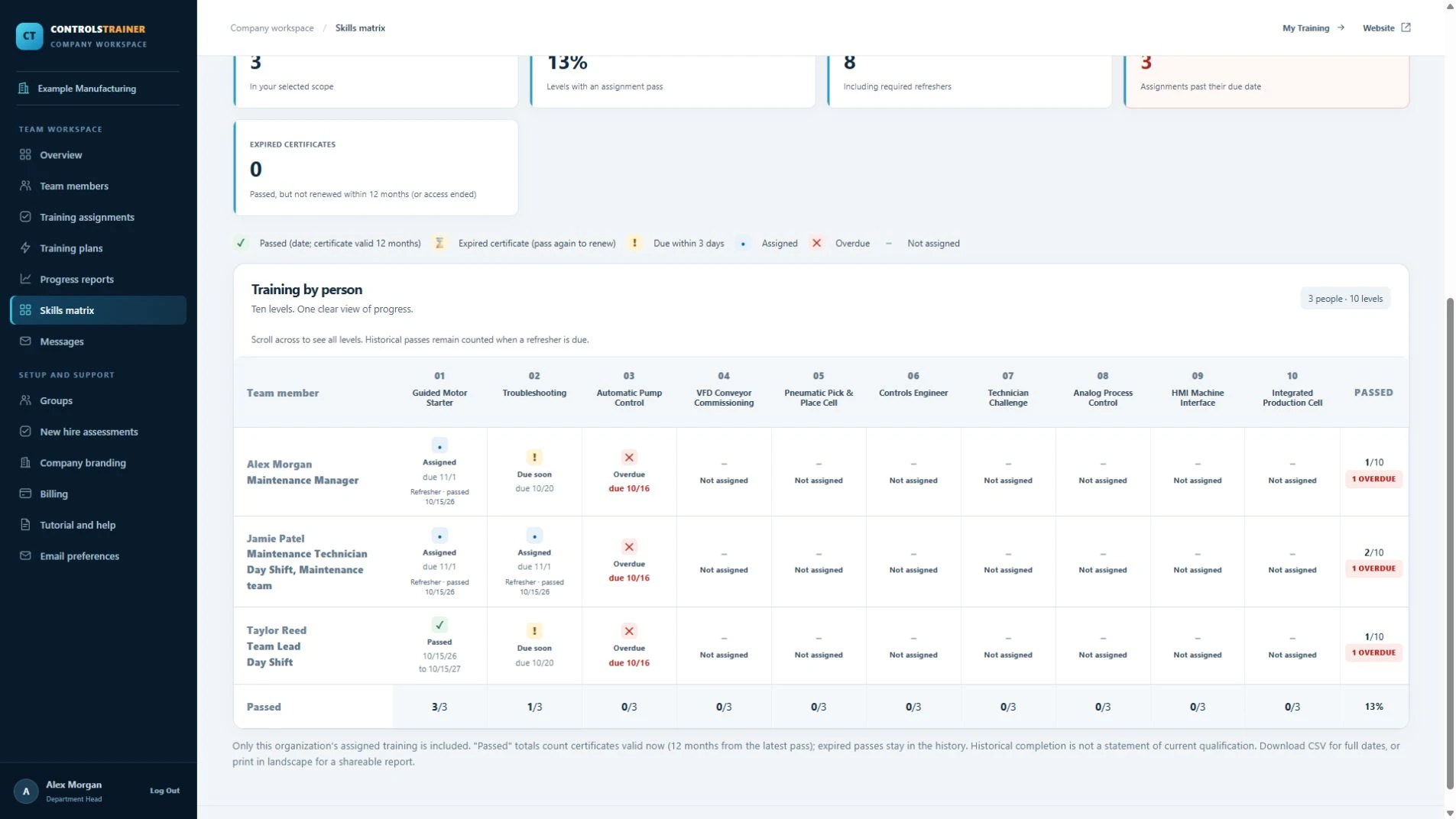
Choose Skills matrix in the company workspace navigation. Read people down the rows and lessons across the columns. Apply the available group filter to focus the review. Look for assigned, due soon, overdue, passed and expired states, rather than reading every colored cell as the same outcome.
Investigate the gaps
Review missing assignments, overdue work and refresher requirements. A blank or unassigned cell needs interpretation against the person’s role. Use the matrix to plan follow-up, not to infer capability from a color alone. A recorded lesson pass describes that exercise, not every task a technician may perform.
Keep evidence and practical evaluation together
Use the available CSV and printable report options when a record is needed. Keep dates, assignment context and certificate status visible. Maintain workplace practical-evaluation and authorization records as well; simulator completion is one part of the training evidence.
A FEW USEFUL DISTINCTIONS
Common questions.
Does this matrix rate hands-on competence?
The ControlsTrainer matrix reports assigned lesson status and completion evidence. It is not an independent assessment of every practical workplace skill.
Why is an earlier completion missing from a company matrix?
The matrix uses the organization’s assignments and membership context. A personal or earlier pass may not satisfy that company assignment.
Can I export the training matrix?
The company matrix provides CSV and printable report options, subject to the signed-in user’s company permissions.
Read the full video transcript
A maintenance skills matrix should make training gaps easier to act on. Here is how to use the assignment-based matrix in Controls Trainer.
Start with the role. List the relevant subjects: electrical fundamentals, PLC logic, troubleshooting, drives, HMI, and safety practice. Choose the lessons that match the work.
In the company workspace, organize people into useful groups. A group might represent a department, role, or training cohort.
Assign the required lessons and due dates through training assignments or a training plan. The matrix reflects the organization’s assignments. An earlier personal completion is not automatically the same as completing a company assignment.
Choose Skills matrix in the workspace navigation. Read people down the rows and lessons across the columns. Use the group filter to focus on one team.
Review the status labels: assigned, due soon, overdue, passed, or expired. A blank cell may mean no assignment. A passed cell records completion of that lesson, not proof of every workplace skill.
Follow up on missing training and refresher needs. Use the CSV or printable report options when you need a record.
Keep practical evaluation and workplace authorization alongside the training records. This makes the matrix a useful planning tool while keeping the evidence accurate.
Explore the company training tools and free pilot at Controls Trainer dot com.
Controls Trainer is an independent educational platform. These examples supplement equipment-specific instruction and practical evaluation. Completion is not OSHA certification, an electrical license, or authorization to work on equipment.