How ladder logic is taught here
| Level | What you do with the logic | Instructions used |
|---|---|---|
| 1 (free) | Read a supplied three-rung program, try edits in PROGRAM mode, reload it | XIC, XIO, OTE, parallel branch |
| 3 | Write the pump control from scratch; no solution is preloaded | XIC, XIO, OTE, branches, TON |
| 4 | Choose the drive’s PLC command strategy from options | Configured, not written in ladder |
| 5 | Review and adjust a preloaded sequence and its permissives | Configured, not written in ladder |
| 6 | Write the inspection-conveyor program from the requirements; editing is locked in RUN | XIC, XIO, OTE, branches |
| 7 | Build the turret sequence from scratch | XIC, XIO, OTE, branches |
| 8 | Verify a preloaded supervisory program split into subroutines | JSR, GEQ, LEQ, XIC, XIO, OTE |
| 9 | Complete the HMI-to-PLC interface rungs | Full editor: XIC, XIO, OTE, OTL/OTU, ONS, TON, CTU, MOV, LIM, GRT, LES, GEQ, LEQ, JSR |
| 10 | Complete the machine’s routines | The full editor (Level 10 also uses EQU) |
First principle: contacts test bits, not buttons
N.O. and N.C. describe a device at rest: nobody pressing it, nothing tripped. XIC (“examine if closed”) and XIO (“examine if open”) test a bit:
- XIC is true when the bit is 1;
- XIO is true when the bit is 0.
An input bit is 1 whenever current reaches that input. So read the device first, then the bit, then choose the instruction. An N.C. device does not automatically mean XIO.
| Device (Level 1) | State | Contact | Input bit | XIC | XIO |
|---|---|---|---|---|---|
| Stop (N.C. 21–22) → IN-1 | released | closed | 1 | true | false |
| Stop (N.C. 21–22) → IN-1 | pressed | open | 0 | false | true |
| Overload trip (N.O. 97–98) → IN-2 | healthy | open | 0 | false | true |
| Overload trip (N.O. 97–98) → IN-2 | tripped | closed | 1 | true | false |
That’s why the run rung uses XIC Stop_PB (true until Stop is pressed) and XIO Motor_OL_Trip (true until the overload trips). A broken wire on Stop reads 0 and stops the motor, which is one reason stop signals are wired N.C.
Worked example: start/stop with seal-in and restart permission (Level 1)
The panel
- Inputs: Start (N.O.) on IN-0, Stop (N.C.) on IN-1, the overload trip contact on IN-2, the contactor’s auxiliary contact (M1_Aux) on IN-3, and the E-stop’s second contact on IN-4.
- Output: Motor_Run on OUT-0 drives the contactor coil.
- Hardware stop: the E-stop’s first contact and the overload’s 95–96 are wired in series with the coil. They drop the contactor whatever the program does.
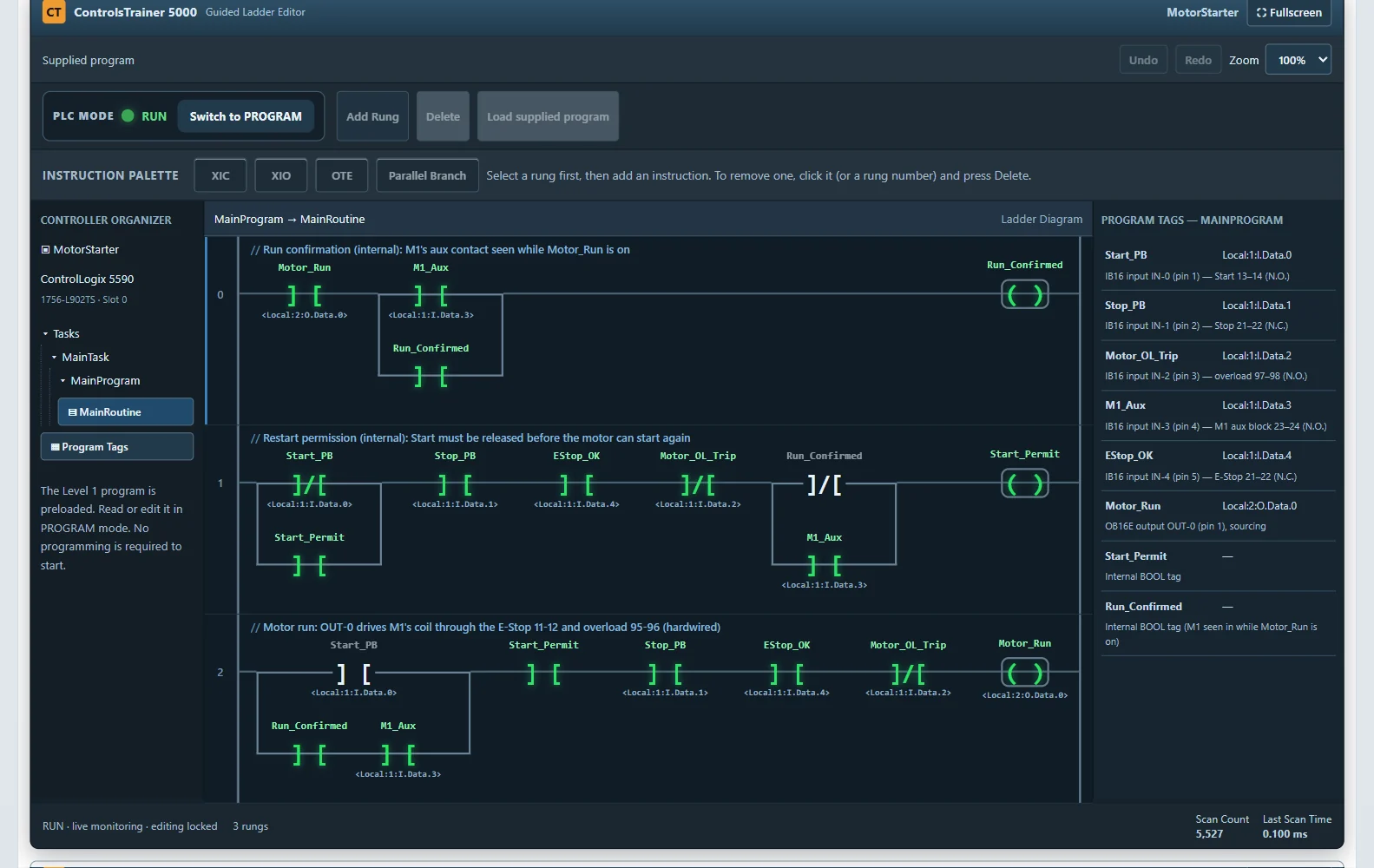
The supplied program, exactly as Level 1 loads it
Rung 0   XIC Motor_Run  [ XIC M1_Aux | XIC Run_Confirmed ]                         OTE Run_Confirmed
Rung 1   [ XIO Start_PB | XIC Start_Permit ]  XIC Stop_PB  XIC EStop_OK
         XIO Motor_OL_Trip  [ XIO Run_Confirmed | XIC M1_Aux ]                     OTE Start_Permit
Rung 2   [ XIC Start_PB | XIC Run_Confirmed XIC M1_Aux ]  XIC Start_Permit
         XIC Stop_PB  XIC EStop_OK  XIO Motor_OL_Trip                              OTE Motor_Run
Brackets are parallel branches; | separates the branch legs.
What each rung does
- Rung 2, the run rung. Start begins it. Once the contactor’s aux contact proves M1 has pulled in, the lower branch (Run_Confirmed with M1_Aux) holds the rung true after you let go of Start: the classic seal-in. Stop, the E-stop and an overload trip each break it.
- Rung 1, restart permission. Start_Permit turns on only after Start has been seen released, and then holds itself. So if someone is holding Start while the E-stop is released, the overload is reset or the power comes back, the motor stays off until Start is released and pressed again.
- Rung 0, confirmed run. It remembers that M1 really pulled in. If M1 then drops out on its own while the PLC still commands it, for example because a wire came off, rung 1’s last branch goes false and removes the permission, so the motor can’t restart by surprise when the fault clears.
This is ordinary control logic, not a safety function. The safety-rated version of this job uses a monitored safety relay, which you wire in Level 6.
Worked example: automatic pump control (Level 3)
The requirements
- Wire a HAND/OFF/AUTO selector and low and high float switches.
- In AUTO, the pump starts at the low float and stops at the high float. HAND runs it; OFF stops it.
- The accepted solution never restarts the pump by itself after an overload trip, an E-stop, a power loss or the contactor dropping out after a confirmed run.
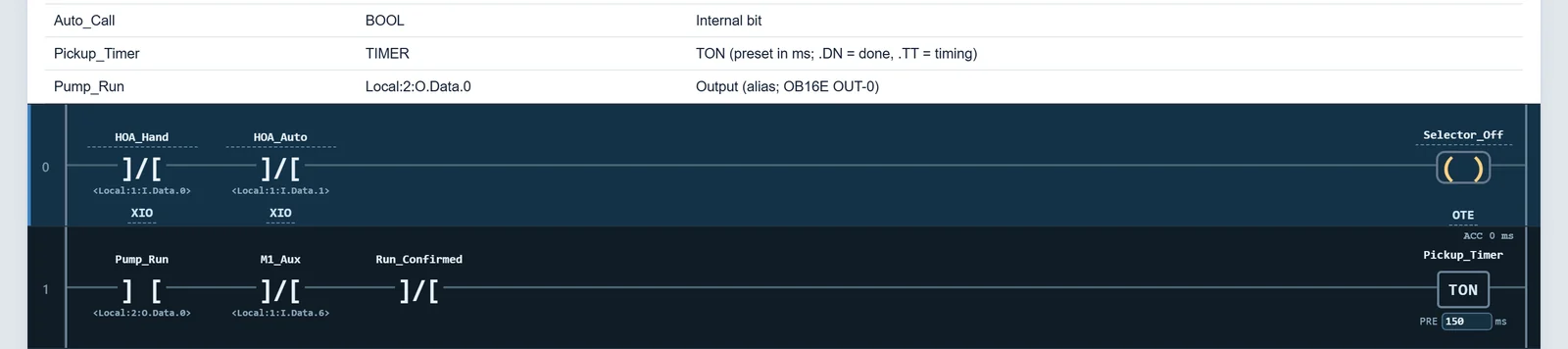
- It also aborts a start that the contactor doesn’t confirm within 150 ms.
- In those cases the selector has to go through OFF first.
Ladder ideas you’ll use
- a seal-in that starts on the low float and holds until the high float, because the low float alone can’t keep the pump on as the level rises;
- a TON timer as a pickup check;
- separate branches for HAND and AUTO.
You write it from scratch with XIC, XIO, OTE, branches and TON; no solution is preloaded.
Logic from requirements (Levels 6 and 7)
Level 6 gives you only the requirements for an inspection conveyor: Start runs it, Stop halts it, a reject sensor and a reject solenoid handle the rejected parts, and pilot lights show the state. The E-stop and the guard drop the conveyor contactor through a Guardmaster 440R safety relay, independent of the PLC.
Level 7’s turret may index 180° on Cycle Start only with a part present and the guard closed, and Stop must work at any time.
In both levels you choose the I/O and write the program yourself. You also learn that the program is only half the job: the relay and the wiring decide what happens when the PLC is wrong.
Structured programs and HMI handshakes (Levels 8–10)
- Level 8: a MainRoutine calls Loop_Control and Alarm_Management subroutines with JSR. GEQ and LEQ compare the level with the high and low alarm setpoints, and the loop may run in AUTO only with a healthy transmitter. You verify this preloaded program rather than write it.
- Level 9: the HMI writes only requests, such as start, stop, mode and setpoint. The PLC decides whether to act, after checking safety, mode and faults. You complete those interface rungs: the command handshake, the mode request, setpoint validation and clamping, first-out capture and alarm acknowledge.
- Level 10: you complete the machine’s routines, such as mode control and process control, in the full editor.
Frequently asked questions
What’s the difference between XIC and a normally open contact?
“Normally open” describes the device. XIC tests the bit: it is true when the input is on. See the table above.
Do I write programs from scratch?
Yes, in Levels 3, 6 and 7. Level 1 gives you a working program to read and modify; Level 8 has you verify one; Levels 9 and 10 have you complete specific routines.
Can I practice ladder logic for free?
Yes. Level 1 is free with no account, and you can edit its program in PROGRAM mode and run it.
Is it the same ladder logic as Allen-Bradley controllers?
It uses the same instruction names (XIC, XIO, OTE, TON and the rest) and the same style of tag addresses as ControlLogix controllers, but it is Controls Trainer’s own editor, not Rockwell software.
Does it cover timers and counters?
Timers from Level 3 (TON). The full editor in Levels 9 and 10 also has counters (CTU), latches, one-shots, moves and comparisons.
Write your first rung on a working machine
Level 1 is free and needs no account.
Trademark note: Controls Trainer is an independent training platform. Allen-Bradley, ControlLogix, PowerFlex, PanelView, Guardmaster, RSLogix and Studio 5000 Logix Designer are trademarks of Rockwell Automation, Inc. Fluke is a trademark of Fluke Corporation, and Festo is a trademark of its owner. These names are used only to identify the equipment the lessons are modeled on. Controls Trainer is not affiliated with, sponsored by or endorsed by any of these companies.